
What’s New in Dynamics 365 Business Central: 5 Key Updates Businesses Should Know
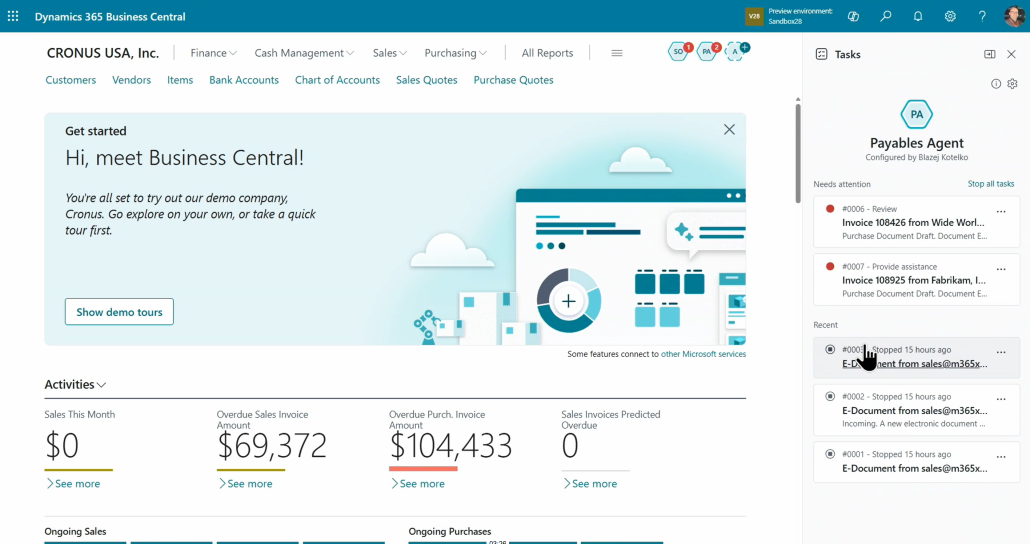
Table of Contents
Dynamics 365 Business Central continues to introduce new updates that help businesses work smarter, improve productivity, and make better decisions. For companies that manage finance, sales, purchasing, inventory, reporting, and operations, these latest updates can make daily processes easier and more efficient.
The latest updates focus on improving productivity, simplifying daily tasks, and helping users get more value from their business data. Some of the biggest improvements include AI-powered agents, wider Copilot availability, enhanced reporting tools, better supply chain features, and new support for sustainability and e-documents.
Below are 5 key updates of Dynamics 365 Business Central that businesses should know.
1. AI Agents Help Users Complete Tasks Faster
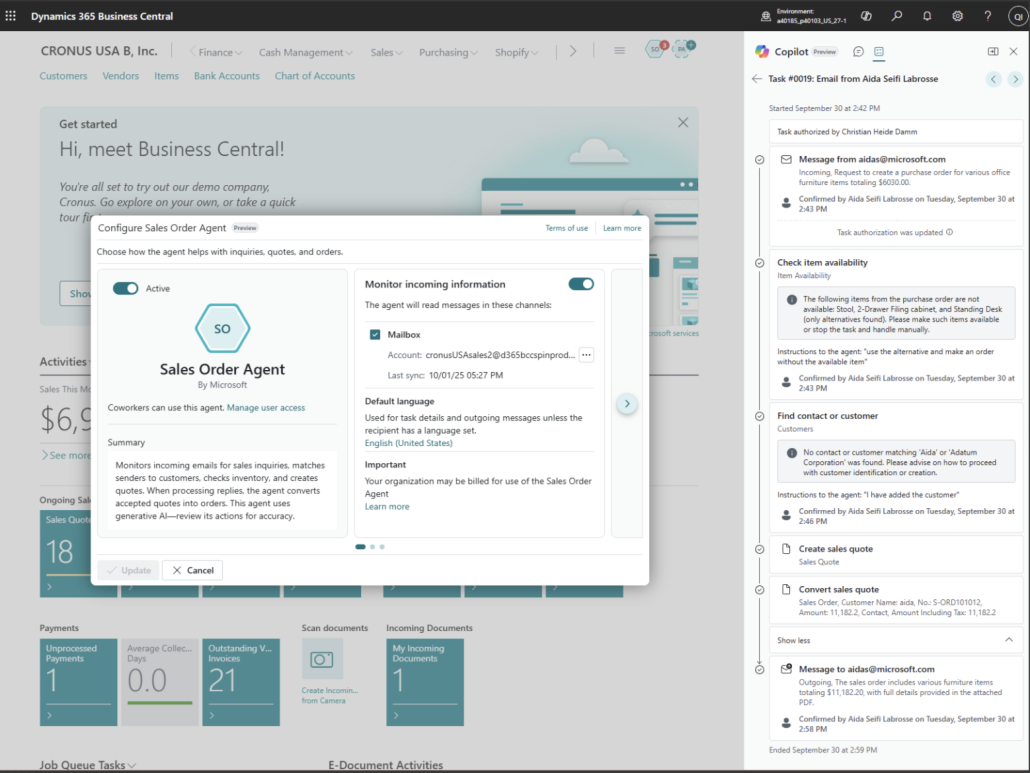
One of the major updates in Dynamics 365 Business Central is the availability of AI agents, such as the Sales Order Agent and Payables Agent.
The Sales Order Agent helps simplify sales order processing. For example, it can capture customer requests from email attachments, identify shipping addresses, calculate item availability, and create sales orders directly. This can help reduce manual data entry and speed up the order process.
The Payables Agent supports accounts payable users by helping them manage supplier invoices more efficiently. It can process emails, assist with invoice matching, and support better data quality. This is useful for finance teams that handle many supplier invoices and want to reduce repetitive tasks.
In simple terms, these agents act like digital assistants inside Dynamics 365 Business Central. They help users complete routine work more quickly, while allowing teams to focus on checking, approving, and managing exceptions.
2. Copilot in Business Central Is Available Worldwide

Another important update is that Copilot in Business Central is available in all countries and regions where Business Central is available.
Copilot brings AI assistance into daily business processes. Users can use Copilot to summarize information, autofill fields, suggest number series, and support tasks across different areas of Business Central.
For many users, this means they can spend less time searching for information or manually preparing content. For example, a user may use Copilot to help summarize a record, prepare marketing text, or support data entry. This can make Business Central easier to use, especially for users who may not be familiar with every function in the system.
For Malaysian businesses, this is useful because many companies want to improve productivity without adding too many manual steps. Copilot can support finance, sales, operations, and management teams by helping them work more efficiently within the same ERP platform.
To learn more about AI features, you can also read our article on Copilot features in Business Central.
3. Better Reporting, Power BI, Excel, and Analysis Tools
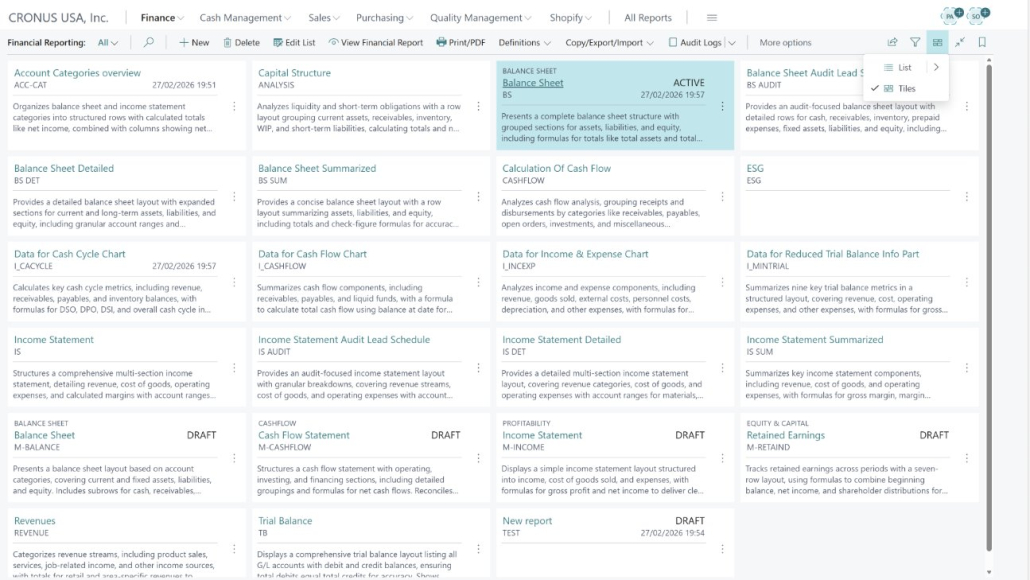
Dynamics 365 Business Central also includes improvements in reporting and data analytics. These updates are useful for businesses that rely on reports to track financial performance, sales, inventory, subscriptions, and audit activities.
The latest updates include enhanced Power BI capabilities, improved Excel integration, stronger financial reporting, better sales analytics, improved inventory reporting, and enhanced IT audit reporting. There are also improvements to Word report layouts, making it easier for users to create and manage report templates.
This is especially useful for finance managers, business owners, and department heads who need quick access to accurate information. Instead of relying only on manual spreadsheets, users can use Business Central together with Power BI and Excel to better understand their business performance.
For example, a company can review sales trends, monitor inventory levels, check customer loyalty, or analyze financial data more easily. This helps decision-makers see what is happening in the business and take action earlier.
4. Supply Chain and Quality Management Improvements
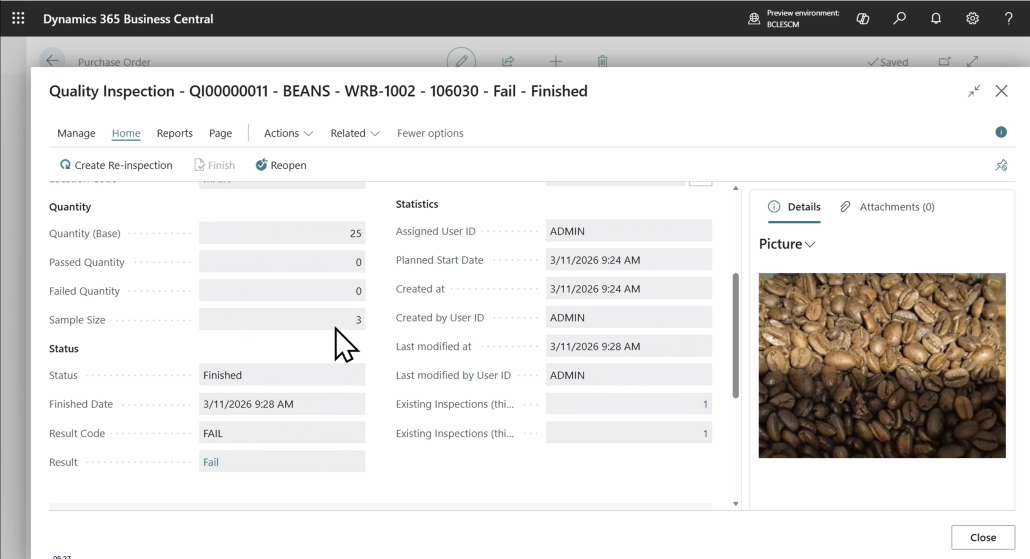
Business Central also introduces improvements in supply chain management. These updates are helpful for companies that manage purchasing, inventory, warehouse activities, drop shipments, and quality control.
One important update is the introduction of a Quality Management extension. This helps businesses manage quality processes more consistently. For companies that sell or manufacture products, quality control is important because customers expect reliable and trusted items.
There are also improvements in purchase order matching. This helps users match purchase invoices with purchase orders and receipts more smoothly. In real business scenarios, invoice matching can take time because there may be differences between ordered items, received items, and supplier invoices. Improved matching can help reduce errors and make invoice handling easier.
Business Central also includes drop-shipment enhancements, such as improvements in purchase order creation methods, order processes, and undo shipment or receipt capabilities. These improvements can help businesses manage sales and purchasing workflows more effectively.
5. Sustainability and E-Document Enhancements
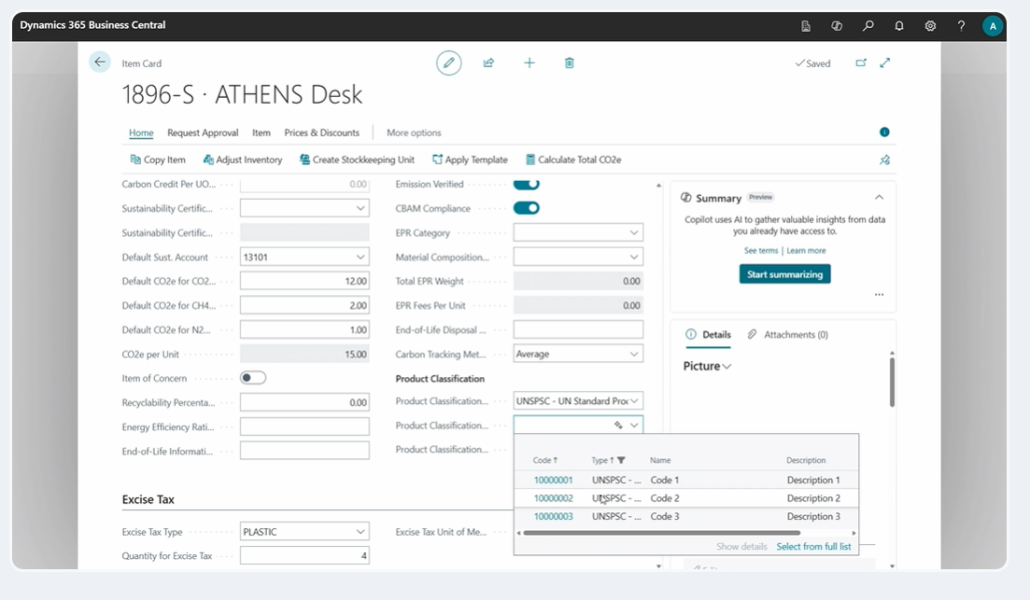
Sustainability and digital compliance are becoming more important for businesses. Dynamics 365 Business Central includes new sustainability-related updates that help companies manage and report environmental data more effectively.
The updates include new sustainability APIs, carbon footprint information in sales document layouts, product classification fields, and carbon costing improvements. These features can support businesses that need to track emissions, prepare ESG-related reports, or improve sustainability reporting.
Business Central also includes updates for e-documents. These improvements include enhancements to Peppol formats, linking inbound e-documents to purchase invoices, setting default e-document types on vendor templates, and supporting localization requirements in selected countries.
For businesses, this means Business Central is continuing to support digital document handling and compliance-related processes. As e-invoicing and digital reporting become more common, these improvements can help companies prepare for future requirements.
Final Thoughts
The latest updates in Dynamics 365 Business Central show that Microsoft is continuing to improve the platform in areas that matter to modern businesses. AI agents and Copilot can help users save time. Better reporting and analytics can support stronger decision-making. Supply chain and quality improvements can make operations more reliable. Sustainability and e-document updates can help businesses prepare for future compliance and reporting needs.
For companies that are already using Business Central, these updates may create new opportunities to improve daily operations. For companies that are still using older ERP systems, this may also be a good time to explore whether Business Central can better support their current and future business needs. Agile Dynamics Solutions can help you understand these updates and identify how Dynamics 365 Business Central can support your business needs.
You can also refer to Microsoft’s official release plan to explore the latest Dynamics 365 Business Central updates in more detail. Microsoft also provides official Business Central documentation for users who want to learn more about the product’s features.
FAQs
1. What is Dynamics 365 Business Central?
Dynamics 365 Business Central is Microsoft’s cloud-based ERP solution that helps businesses manage finance, sales, purchasing, inventory, operations, reporting, and more in one system. It is designed to help companies work more efficiently, reduce manual processes, and get better visibility of their business performance.
2. What are the main new updates in Dynamics 365 Business Central?
Some of the key updates include AI-powered agents, wider Copilot availability, improved reporting and analytics, supply chain and quality management enhancements, and new sustainability and e-document features. These updates are designed to help users save time, improve accuracy, and make better business decisions.
3. How can AI agents help Business Central users?
AI agents such as the Sales Order Agent and Payables Agent can help users handle routine tasks more efficiently. For example, they can support sales order processing, invoice matching, email processing, and data quality checks. This helps reduce manual work and allows teams to focus on reviewing and managing important exceptions.
4. Is Copilot available in Business Central?
Yes. Copilot in Business Central is available in all countries and regions where Business Central is available. It can assist users with tasks such as summarising information, autofilling fields, suggesting number series, and supporting daily work across different areas of the system.
5. How can businesses learn more about these Business Central updates?
Businesses that want to understand how these updates apply to their operations can contact Agile Dynamics Solutions (ADS). The ADS team can explain the latest Business Central capabilities and advise how they may support finance, operations, reporting, supply chain, and overall business management needs.
Interested to learn more about Business Central updates?
Book a FREE consultation session today!
*Our representative will contact you within 24 hours after submitting the form, this excludes weekends and public holidays.